Digital Planners and ADHD: How the Right Planning System Can Make Daily Life Easier
For many people, staying organized appears straightforward: write down important dates, make a to-do list, and complete each task in order. For individuals with attention-deficit/hyperactivity disorder, commonly known as ADHD, that process can be much more complicated.
ADHD can affect attention management, working memory, planning, organization, task initiation, and the ability to estimate how long activities will take. Adults with ADHD may find it difficult to remember appointments, finish lengthy projects, maintain routines, or keep track of responsibilities across work, school, home, and family life. (CDC)
These difficulties are not evidence of laziness, carelessness, or a lack of motivation. They are often connected to differences in executive functioning—the mental processes that help people activate, organize, prioritize, monitor, and complete tasks. (CHADD)
A thoughtfully designed digital planner cannot diagnose or treat ADHD, but it can provide valuable external structure. Instead of relying entirely on memory and internal motivation, a planner creates a visible place for appointments, priorities, reminders, ideas, routines, and unfinished tasks.
For the right user, a digital planner can become more than a calendar. It can serve as an external command center for everyday life.
What Is a Digital Planner?
A digital planner is an electronic planning document designed for use on a tablet, smartphone, or computer. Most digital planners are supplied as PDF files and opened inside a compatible note-taking or PDF-annotation application.
Depending on the planner and app, users can:
* Write by hand with a stylus.
* Type directly onto pages.
* Highlight important information.
* Duplicate useful templates.
* Add digital stickers or images.
* Move between sections using hyperlinks.
* Store several years of plans on one device.
* Erase, revise, or reorganize entries without starting over.
A digital planner combines the familiar appearance of a paper agenda with the flexibility of a digital workspace. It can contain yearly calendars, monthly overviews, weekly schedules, daily pages, project planners, habit trackers, meal planners, financial pages, notes, and reflection prompts.
Unlike a standard calendar app, a digital planner generally gives users more space to think, write, organize, and personalize their planning process.
Why Traditional Planning Can Be Difficult With ADHD
Many conventional planners assume that the user will consistently remember to open the planner, identify the most important task, divide large projects into manageable steps, estimate time accurately, and return to unfinished work later.
Those assumptions may not match the experience of someone with ADHD.
A person may enthusiastically fill out a new planner for several days and then completely forget it exists. Another person may create a long task list, become overwhelmed by the number of choices, and avoid the list entirely. Someone else may remember an appointment but underestimate the preparation and travel time required to arrive promptly.
Common planning challenges can include:
Working-memory overload
Working memory allows a person to hold and use information temporarily. When several responsibilities compete for attention, important details can disappear quickly.
A planner provides a reliable place to record information before it is forgotten.
Difficulty starting tasks
Knowing what needs to be done does not always make beginning easier. A task such as “clean the house” may feel too large or vague to activate.
A planner can convert the task into smaller actions:
1. Put dishes in the sink.
2. Start the dishwasher.
3. Collect laundry.
4. Clear one countertop.
The first visible action is often less intimidating than the entire project.
Time blindness
Some people with ADHD describe difficulty sensing the passage of time or accurately estimating task duration. Ten minutes may feel like an hour during an unpleasant task, while several hours can disappear during an interesting activity.
Time blocks, scheduled transitions, and visual daily layouts can make time more concrete.
Competing priorities
When every task feels urgent—or none of them feels immediately rewarding—it can be hard to decide where to begin.
A planner with a designated “today’s focus” or “must do” section reduces the number of decisions required.
Out-of-sight, out-of-mind responsibilities
Bills, follow-up messages, renewals, and long-term projects may be unintentionally forgotten when they are not visible.
Recurring planning sessions and clearly labeled sections can keep these responsibilities available for review.
How a Digital Planner Can Help an ADHD Brain
The most useful planner is not necessarily the one with the greatest number of pages. It is the planner that reduces friction between remembering a responsibility and taking the next action.
1. It externalizes memory
Trying to mentally store every appointment, deadline, household responsibility, and new idea consumes cognitive energy.
Writing those items into a planner transfers some of that burden to an external system. The user no longer has to repeatedly remind themselves not to forget something. They only need a consistent habit of capturing and reviewing information.
A planner can hold:
* Appointments
* Work deadlines
* School assignments
* Medication or wellness reminders
* Household tasks
* Bills and renewals
* Shopping needs
* Follow-up messages
* Project ideas
* Personal goals
This does not eliminate forgetfulness, but it creates a dependable place to recover information.
2. It makes priorities visible
A long, unfiltered to-do list can increase overwhelm. An ADHD-friendly daily page should help distinguish between what would be nice to complete and what genuinely requires attention.
Useful priority sections may include:
* Today’s focus
* Start here
* Must do
* Can wait
* Follow up
* Schedule for later
This creates a clearer path through the day. Instead of choosing among 25 tasks, the user sees one starting point and a limited set of essential actions.
3. It supports task breakdown
Large projects often become more approachable when transformed into small, physical actions.
For example, “finish website” is difficult to act on because it contains many hidden steps. A project page can reveal the actual sequence:
* Review the homepage.
* Replace the banner image.
* Test the checkout button.
* Proofread the shipping policy.
* Publish the latest changes.
A particularly useful prompt is “What is the next smallest step?”
The answer should be so specific that the user can begin without additional planning.
4. It creates visual time
Monthly, weekly, and daily views serve different purposes.
A monthly calendar reveals deadlines, appointments, and busy periods. A weekly view connects those events to available work time. A daily page provides the detail needed to act.
Moving between these views can help users understand not only what must happen, but when there is realistic space to do it.
5. It offers a home for distracting thoughts
A sudden thought can easily pull attention away from the current task:
* “I need to order detergent.”
* “I should research that business idea.”
* “I forgot to reply to that message.”
* “Maybe I should reorganize the entire office.”
A brain-dump section gives the thought somewhere to go. The user can record it without immediately following it.
This is not about suppressing ideas. It is about preserving them while protecting the task already in progress.
6. It can make planning more rewarding
Motivation often improves when a system provides immediate satisfaction. Digital planning can offer enjoyable elements such as handwriting, checkboxes, stickers, color coding, progress tracking, and completed-task marks.
A built-in reward prompt can also encourage the user to pair effort with something positive:
After completing this task, I will take a walk, make coffee, watch an episode, play a game, or spend ten minutes on something enjoyable.
Rewards do not have to be expensive or elaborate. Their purpose is to make completion feel more immediate.
7. It reduces the fear of making mistakes
Some users stop using paper planners after crossing out appointments, missing several days, or creating pages that no longer look neat.
A digital planner is easier to revise. Entries can be erased, moved, resized, copied, or rewritten. Missing a week does not ruin the planner.
The goal is not to maintain a perfect record. The goal is to return whenever support is needed.
8. It keeps multiple planning tools together
An effective digital planner can replace several loose notebooks and lists with one organized file.
Instead of maintaining separate documents for appointments, projects, habits, grocery lists, meeting notes, and bills, users can access those sections through one central index.
Hyperlinks are especially helpful because they reduce the number of taps and searches required to find the correct page.
What Makes a Planner ADHD-Friendly?
Adding “ADHD” to a product title does not automatically make a planner appropriate for ADHD-related needs.
A genuinely focus-friendly planner should reduce cognitive load rather than add to it.
Look for the following qualities.
Clear visual hierarchy
The most important section should be easy to identify. Pages should not force the eye to compete with excessive decoration, crowded boxes, or too many prompts.
Limited daily priorities
An endless task list can become a record of unfinished work. A designated focus, start-here section, and concise must-do list are often more practical.
Fast navigation
A digital planner containing hundreds of pages should include reliable hyperlinks, tabs, or an index. Users should be able to move among yearly, monthly, weekly, and daily views without manually scrolling.
Space for unstructured thinking
Not every thought belongs inside a scheduled time block. Brain dumps and notes sections allow the user to capture information before organizing it.
Project-planning pages
Project templates should support breaking goals into steps, identifying deadlines, and selecting the next action.
Reflection without judgment
Daily, weekly, and monthly reflections can help users notice patterns in energy, workload, and routines. The language should feel constructive rather than punitive.
Flexible use
The planner should allow a person to use only the pages that help. A user should not feel required to complete every tracker, prompt, or reflection section.
How to Use a Digital Planner Without Becoming Overwhelmed
A planner can contain hundreds of useful templates and still fail when the user attempts to use everything at once.
Start with the smallest possible system.
Step 1: Choose one capture location
Use the planner as the primary place for tasks, appointments, and ideas. Scattered information is harder to review.
Step 2: Complete a short daily planning session
CHADD recommends establishing a regular daily planning time and using it to prepare a mental map of the following day. (CHADD)
A useful planning session can take five minutes:
1. Check tomorrow’s appointments.
2. Select one main focus.
3. Write the first action.
4. Choose up to three essential tasks.
5. Schedule anything tied to a specific time.
Step 3: Separate immediate tasks from future goals
Long-term and short-term tasks should not compete on the same daily list. CHADD notes that keeping them separate can prevent large goals from being repeatedly rewritten without meaningful progress. (CHADD)
Keep future ideas on a project, goals, or “save for later” page. Place only actionable items on the daily page.
Step 4: Plan transitions, not just appointments
An appointment at 2:00 p.m. may require preparation at 1:15, departure at 1:30, and a reminder at 1:45.
Add those transition points to the schedule.
Step 5: Review the planner at the same moments each day
Attach planner use to routines that already happen:
* After morning coffee
* At the beginning of work
* After lunch
* Before shutting down the computer
* Before going to bed
Consistency matters more than spending a long time planning.
Step 6: Restart without trying to catch up
After several unused days, begin with today. Do not attempt to reconstruct every missed page.
A planner is a support tool, not an attendance record.
Recommended ADHD Digital Planner: The 2026–2027 ADHD Planner From NicheFlow
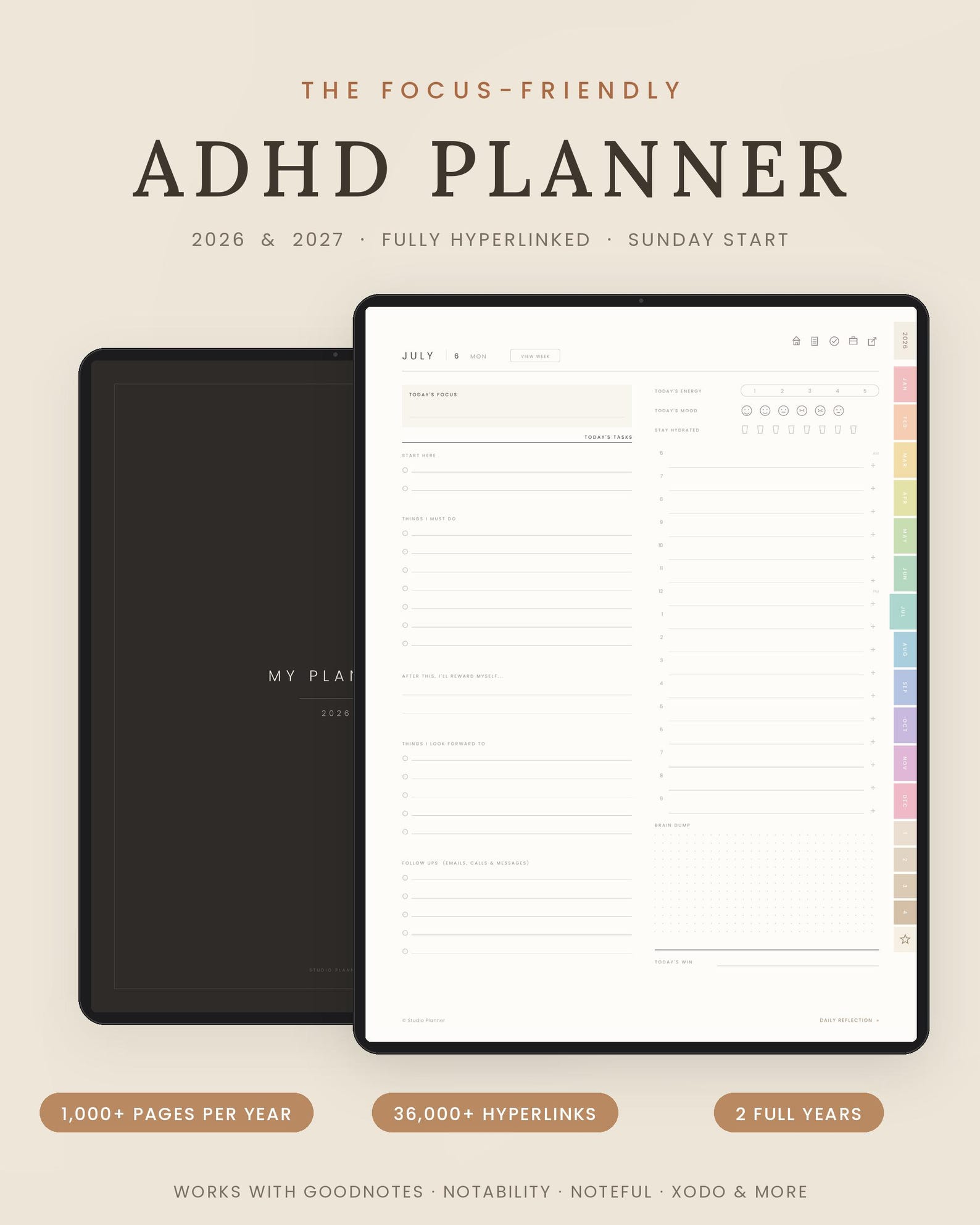
For readers who want a comprehensive but visually calm planning system, the 2026–2027 ADHD Digital Planner from the NicheFlow Etsy shop is worth considering.
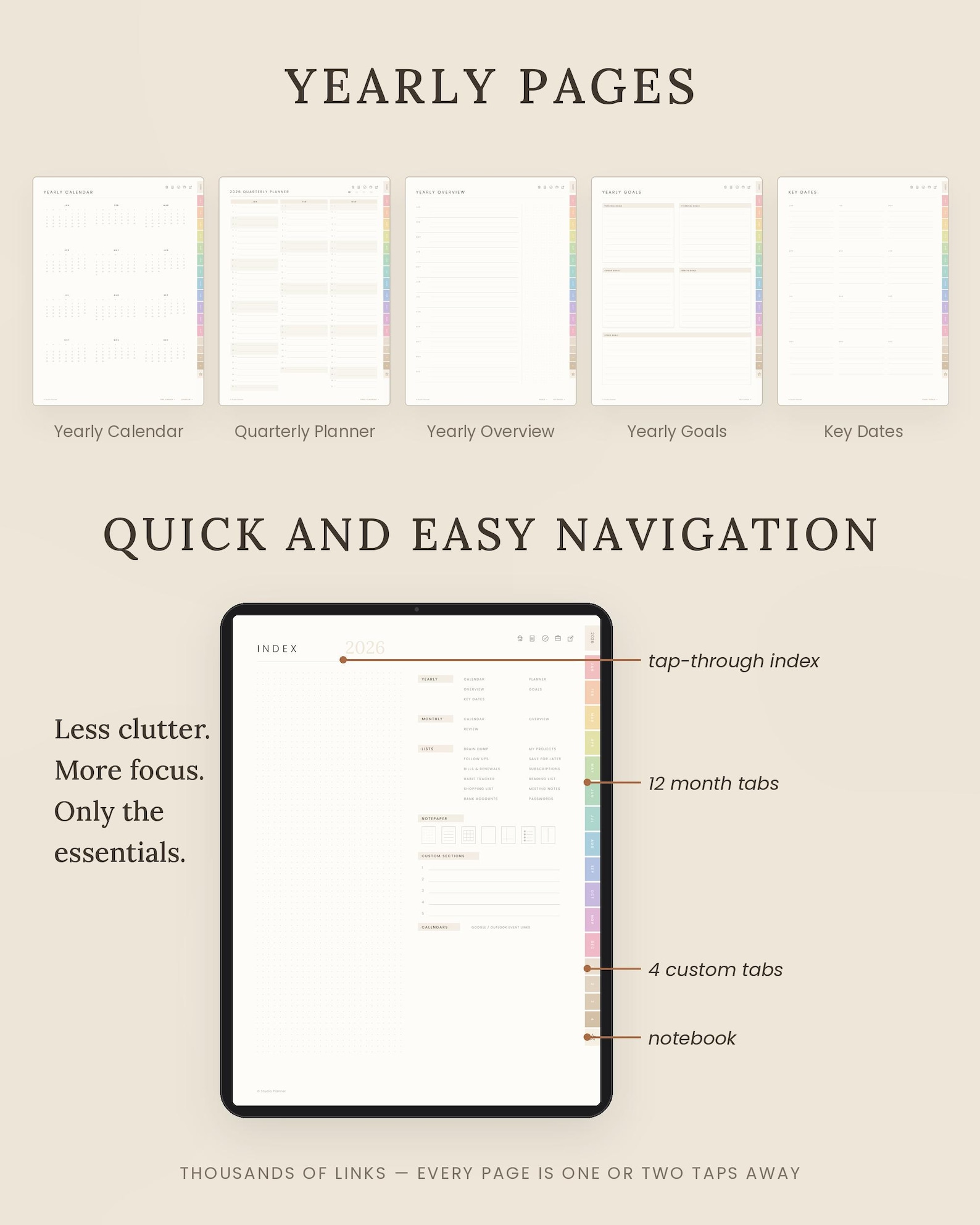
This Sunday-start planner includes separate files for 2026 and 2027. Each year contains 1,045 pages and more than 36,000 working hyperlinks, allowing users to move among dates, weeks, months, notebooks, and planning sections with a tap. (Etsy)
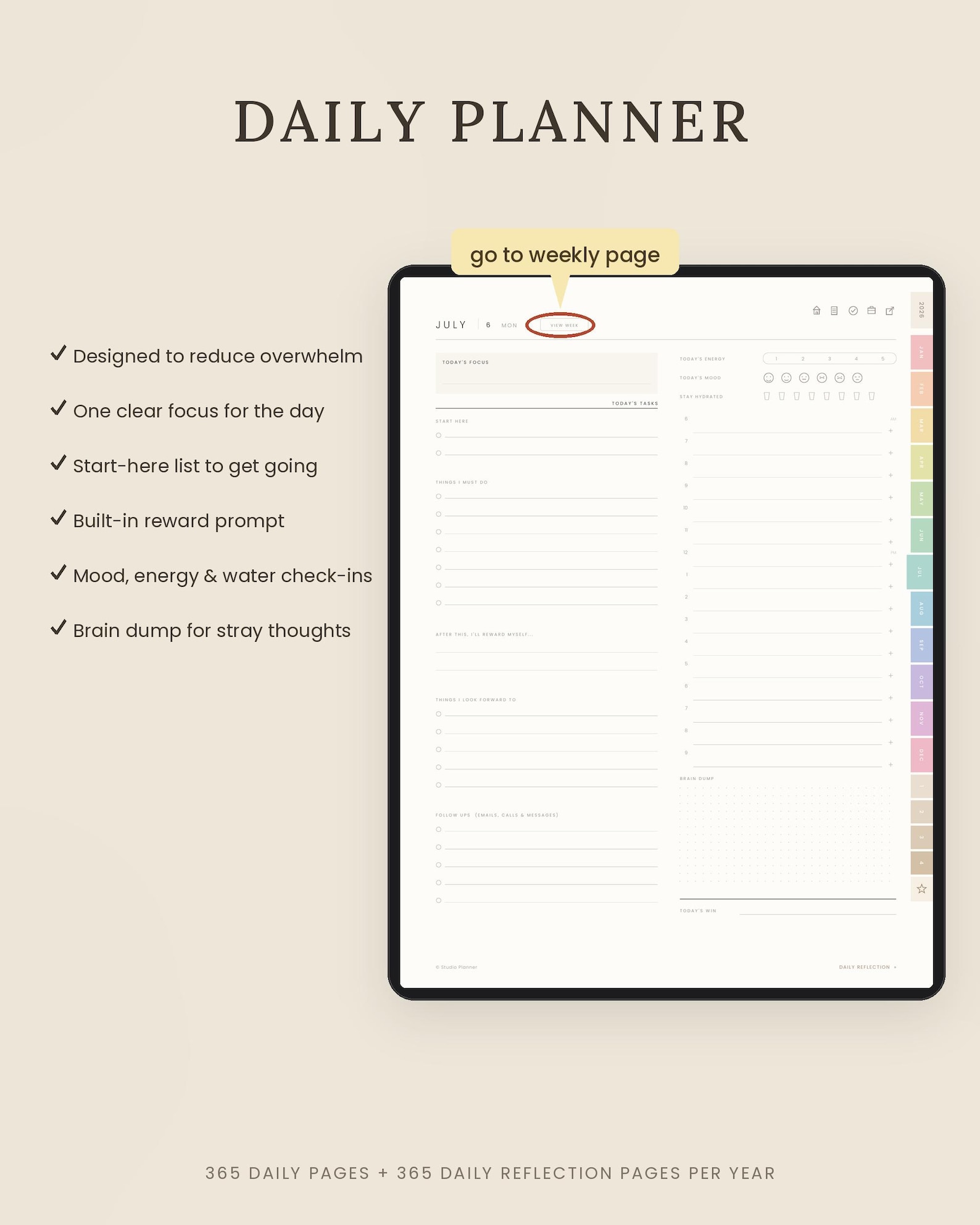
Rather than centering the daily layout around an intimidating task list, the planner provides:
* One clear daily focus
* A start-here list
* A separate must-do list
* A built-in reward prompt
* Mood, energy, and hydration check-ins
* A brain-dump area
* Daily reflection pages
These sections address several common sources of planning friction. The focus box narrows attention, the start-here area supports task initiation, and the brain dump gives unrelated thoughts a safe place to be recorded.
Weekly planning and reflection
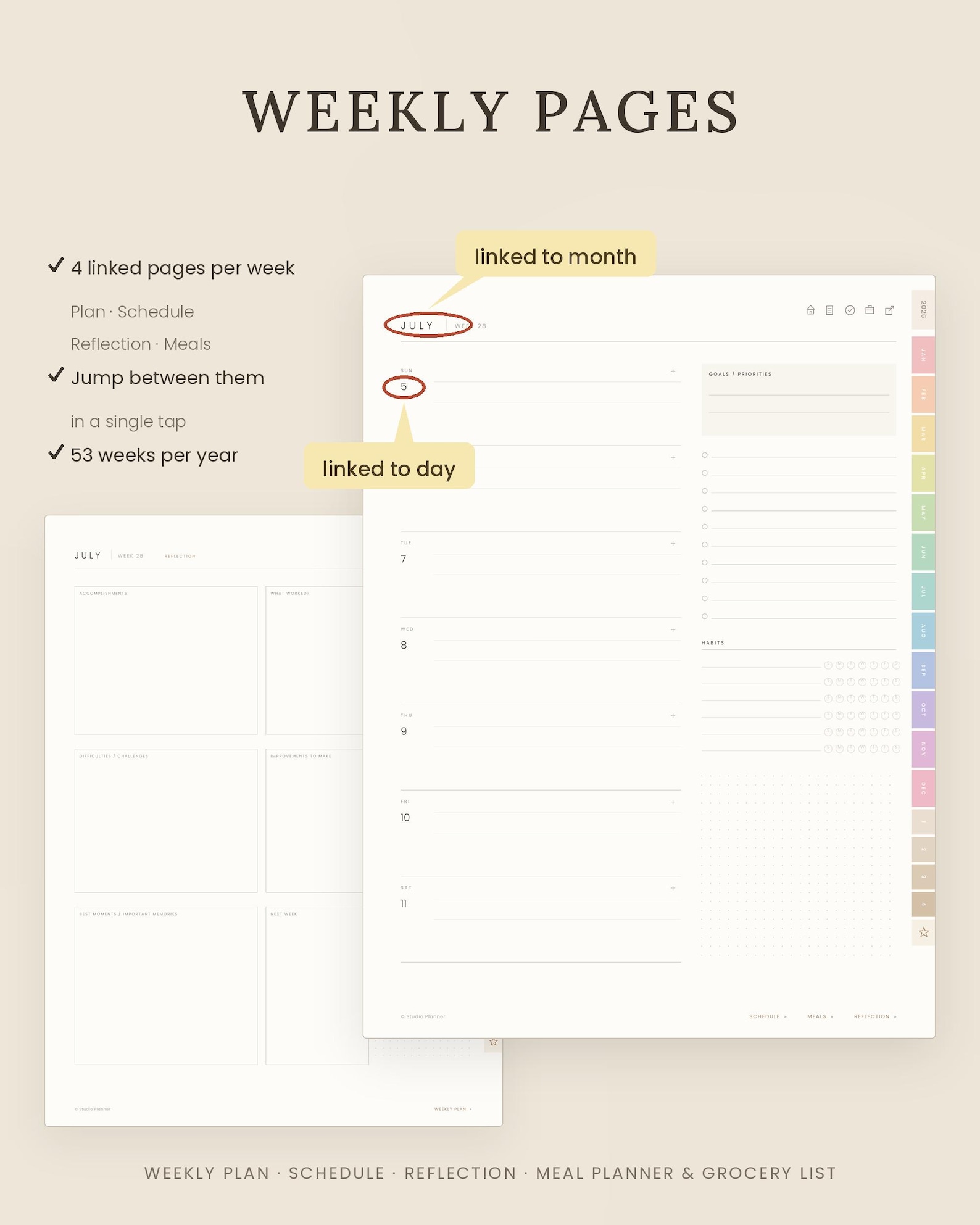
Each week includes linked pages for planning, scheduling, reflection, meal planning, and grocery organization. The Etsy listing describes 53 weeks per year, with four connected weekly pages that users can navigate in a single tap. (Etsy)
This structure can help users separate different kinds of thinking. Appointments can remain on the schedule, goals can stay on the planning page, and observations can be recorded during reflection.
Monthly planning with connected navigation
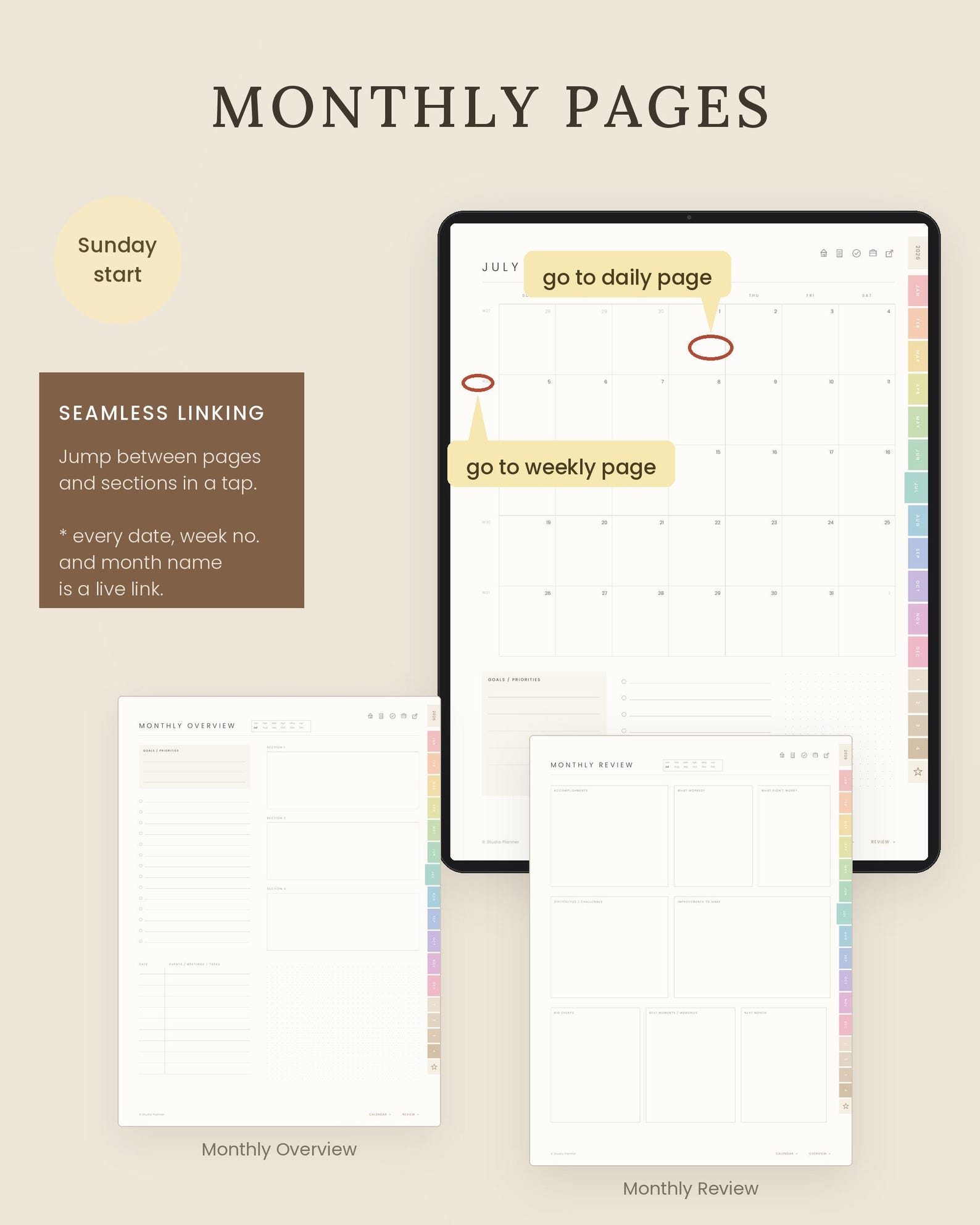
The monthly section includes a calendar, overview, and review. Dates, week numbers, and month names function as check here live links, making it easier to move between planning levels without scrolling through hundreds of pages. (Etsy)
The planner also includes yearly calendars, quarterly planning, goals, key dates, 20 linked project boards, follow-up lists, meeting notes, bills and renewals, subscriptions, shopping pages, habit tracking, reading lists, and a color-coded digital notebook. (Etsy)
One especially helpful project feature is a box for identifying the next smallest step. This can convert an abstract goal into an action that is easier to begin.
Calendar-event links
Users can tap a plus sign beside a time slot to create a calendar event for that date and time. According to the product description, the links support Google Calendar and Outlook, with Apple Calendar available through the Shortcuts app.
The listing also clarifies that this feature opens the selected calendar application; events do not automatically synchronize back into the PDF planner. (Etsy)
That distinction is important. The planner and calendar app work together, but they remain separate systems.
Compatible applications
The planner is designed for PDF-annotation applications including:
* Goodnotes
* Notability
* Noteful
* Noteshelf
* Samsung Notes
* Penly
* Xodo
* CollaNote
* ZoomNotes
Users should install a compatible application and import the PDF before writing with a stylus or keyboard. The purchase is an instant digital download; no physical planner is mailed. (Etsy)
Who May Benefit Most From This Planner?
The NicheFlow ADHD planner may be especially useful for:
* Adults who want daily, weekly, and monthly planning in one file
* Students balancing classes, assignments, routines, and personal tasks
* Freelancers or business owners managing several active projects
* Parents coordinating family schedules and household responsibilities
* Users who prefer handwriting on a tablet
* People who need a dedicated place for distracting thoughts
* Anyone who benefits from clearly defined priorities and next steps
It may be less suitable for someone who dislikes using tablets, wants automatic two-way calendar synchronization, or prefers an extremely simple calendar with no additional planning templates.
A Planner Is Support, Not a Test of Discipline
The value of a digital planner is not measured by how many pages are perfectly completed. It is measured by whether the system makes the next useful action easier to see.
For someone with ADHD, that may mean remembering an appointment, starting a delayed task, breaking a project into steps, recording an idea without chasing it, or recognizing that the day contains more commitments than time.
No planner will work identically for every person. ADHD experiences vary, and organization tools should be adapted to the individual. A planner is also not a substitute for professional evaluation or treatment when those services are needed.
However, when a planning system provides clear priorities, low-friction navigation, flexible writing space, project breakdowns, and room for reflection, it can become a meaningful form of everyday support.
The 2026–2027 ADHD Digital Planner from NicheFlow brings those tools together in a warm, minimalist digital format designed to reduce visual and mental overload.
View the planner on Etsy:
2026–2027 ADHD Digital Planner by NicheFlow
Product details, availability, pricing, and features may change. Review the current Etsy listing and application requirements before purchasing.